

After installing Windows 2008 on my VMware Server virtual machine, the first thing I did was to install an anti-virus software. I won’t be browsing the Internet on this server, but it will be always connected to the network, so just in case a Trojan horse tries to find a haven on this machine, is better to have an anti-virus installed. Read my previous post on the link below.
Installing Microsoft Server 2008 On VMware Server 2.0
this is a testing machine using a Windows 2008 trial version, which I’ll have to uninstall after the trial period expires, so for that reason I won’t buy a commercial Antivirus software for a server, but if you are setting up a server for a production environment, I recommend you invest in a more robust antivirus software than Clamwin.
One of the limitations of Clamwin is that it does not support real-time scanning, that means you have to manually start the scan in order to catch the viruses or spyware. The only thing we can do is setup a scheduled scan.
Let’s get Clanwin up and running.
Download Clamwin Antivirus from http://clamwin.com save the installation file in a folder on your desktop. The installation of Clamwin should be straightforward.
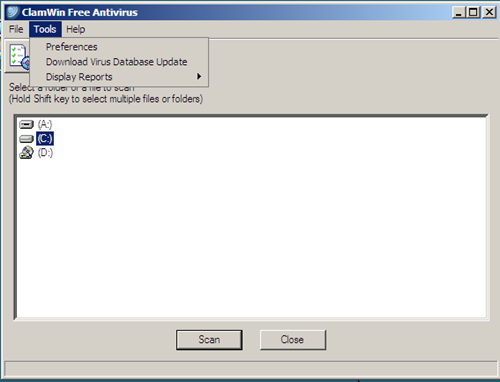
To setup the scheduled scan on Clamwin click on Tools, and select Preferences:
when the clamwin preferences open, click on Scheduled Scans then click on Add:
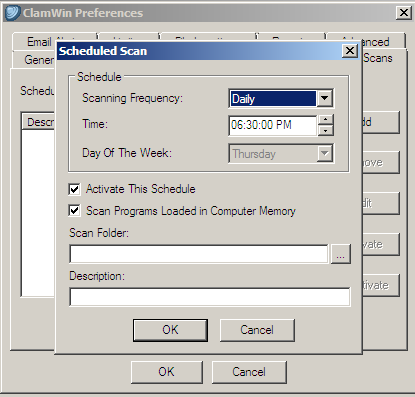
The above window should pop-up.
Choose the scanning frequency you want to have. For me, daily scanning is a good option. Then choose the Scan Folder that, that should be your C drive. Add a description so you know that scheduled scan is setup. Close out of all the windows.
That’s it.
Was this helpful?
0 people found this helpful