
Change Product Key On Windows Server 2008


If for some reason you can’t change the product key of your Server 2008 under My Computer Windows Activation option:
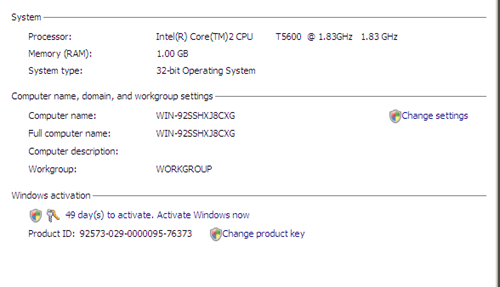
iWindows Activation

Do the following.

  1. Open the command prompt and change working directory to System32 directory
  2. Type in slmgr.vbs -ckms (this clears and KMS entry you may have)
  3. Type slmgr.vbs -upk (this removes any product key installed)
  4. Type slmgr.vbs -ipk xxxxx-xxxxx-xxxxx-xxxxx-xxxxx (where the x’s is the new product key you want to use )
  5. Type slmgr.vbs -ato (this activates the server)

after doing that, Windows Server 2008 should show up as activated.


Related Posts


13 Comments »

  1. Comment by: nelson

    activating windows 2008 has never been easier

  2. Comment by: Josh

    Worked great thank you

  3. Comment by: someone

    I tried this but it installs product key but when i type slmgr.vbs -ato it shows error activating windows.

  4. Comment by: Murat

    Thank you so much, it really easy and worked successfully.

  5. Comment by: emospy

    Worked great for me too. Thank You!

  6. Comment by: Techy

    …. why not just click the change product key button under system?
    for example right click computer, click properties. change product key?

  7. Pingback by: Nerd Alert | Gecko Bloggle

    [...] Change Product Key On Windows Server 2008 [...]

  8. Comment by: Ben

    Thanks for this post, helped out great.
    @Techy – that button doesn’t always work.

  9. Comment by: Shshikant

    hi this shashikant i want to product key on server2008 server

  10. Comment by: Ashwani

    i m interested in windows server 2008

  11. Comment by: rushi

    hi this rushi i want to product key on server2008 server

  12. Comment by: Hans

    Works great, thanx, but only when logged as the administrator who originate installed the OS. Works not when logged on as a arbitrary domain admin

  13. Comment by: Ameeruddin

    hello everybody,
    thanks for the help, but it didn’t worked for me.
    it shows error 0*c004f050.

Leave a comment

If you want to leave a feedback to this post or to some other user´s comment, simply fill out the form below.

(required)

(required)