
How To Setup A Wireless Profile On Windows 7
Recently I wrote a post on how to connect to a wireless access point on Windows 7, but at some point you probably will have to setup a wireless profile manually on your Windows 7 computer, so now in this article I will show you how to do that.
On windows 7, and on most of Windows versions, the wireless bar is located at the right hand side of the system bar, close to the system clock:

If you click on the wireless bar, the currently available wireless window come up:
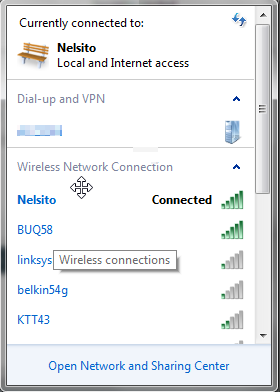
click on “Open Network and Sharing Center” that should bring you to the control panel network management utility:
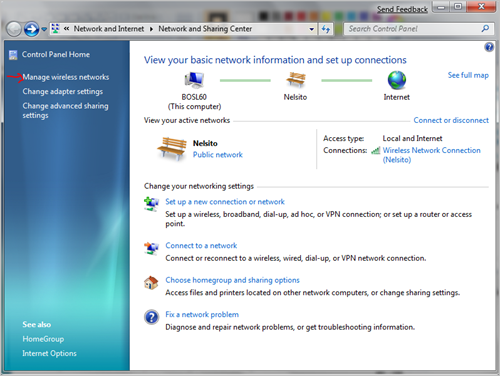
click on “Manage wireless networks” as my nice arrow indicates (:> clicking on that should bring you to the wireless network utility, click on Add:
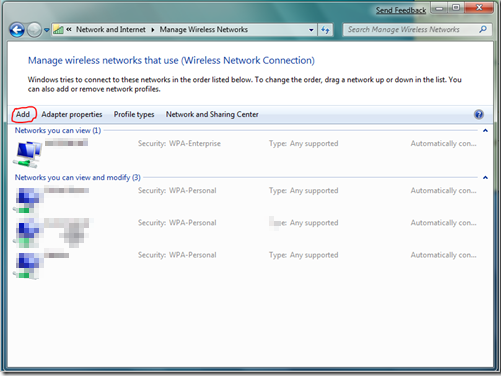
The manually connect to wireless wizard will come up. click on Manually create a network profile:
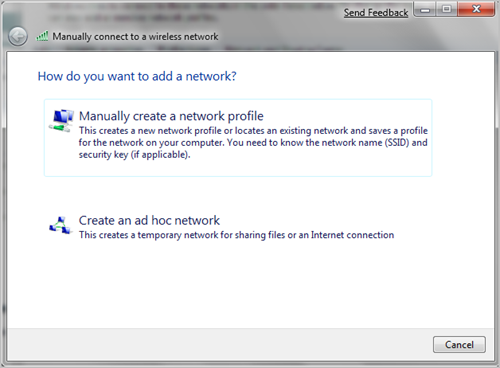
Enter the wireless access point on the next window that comes up:
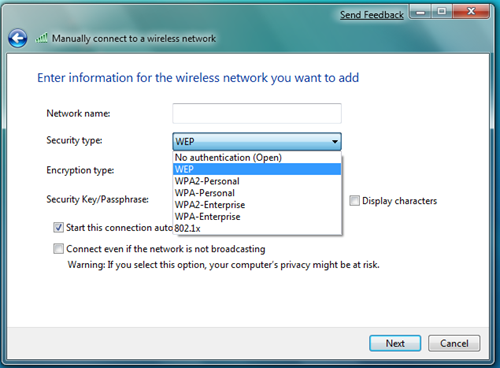
Enter your settings accordingly, and if you wish to, check the “Start this connection automatically” click Next after entering your information. and that should setup the local profile for your wireless on your laptop.
Related Posts
- How To Connect To a Wireless Access Point in Windows 7
- Changing Static IP Address To Dynamic In Windows 7
- Setup Linksys Router With Radius Server
- Setup Linksys Router With Radius Server Authentication
- Configure A Linksys Router with a Static IP Address
- Customize Office 2003 Installation Using Microsoft Office Resource Kit
- How To Install Active Directory On Windows Server 2008
15 Comments »
Leave a comment
If you want to leave a feedback to this post or to some other user´s comment, simply fill out the form below.

I have tried all that but linksys coniction is not displaying web page i have win 7 r c but connecting is not completing. why can some one guide me step by step.
uh, for me, it doesn’t even say Manage Wireless Networks. It just says Change adapter settings and Change advanced sharing settings. HELP!!!! I have ultimate for windows 7 if that helps
oh yeah, and my laptop is a Toshiba Satellite M505-S4940 if that helps at all
I don’t have a password on my network, but Windows 7 won’t connect without it. Can you tell me what to put in the password box. I did set it to No authentication but that didn’t work.
When i press Manually create a network profile it says ‘An unexpeted error occourred’
please help me
I have a problem. When I come to step when a need to create Manually create a network,I get an error “An unexpected error occurred” Can you help me please!!!!
A big thank you to Forever Geeks. I just couldn’t this to work until I followed the above instructions step by step – It worked first time! Thanks again.
This is for “oFloodfloo” – I had the same problem not knowing the password for my network – It turns out that it was the “8″ digit pin number on my Router…hope this helps…
this has not resolved the problem
I have set up the local profile (using the third key) but now I don’t know how to make it actually connect? Any ideas?
THIS HAS NOT RESOLVED THE PROBLEM STILL SAYS CONNECTED BUT NO INTERNET ACCESS
This is a problem with Widows 7. I tried all the wireless adapters, even cheap ones with ubuntu and it was working flawlessly. I have spent useless hours trying to solve in windows 7 but none..
when i contact to net by my laptop i try to sent net to other laptop i couldn’t it contact between other by wirless but it wasn’t sent net
I personally prefer window xp service pack to and three. they are less complecating to me. my windows 7 will not connect to wireless and when i click on the network button at the bottom it only show diaup and not wireless.. please help me. understand what is going on. why did this people creat such a bad software
my wireless did not show any connection at all..show connections are available, but can not connect, please help, been trying to get this wireless thing done for 3 days.