

If you are using Windows offline files to sync files to a remote network shared drive, then you probably know that you cannot sync up folders bigger than 2 GB.
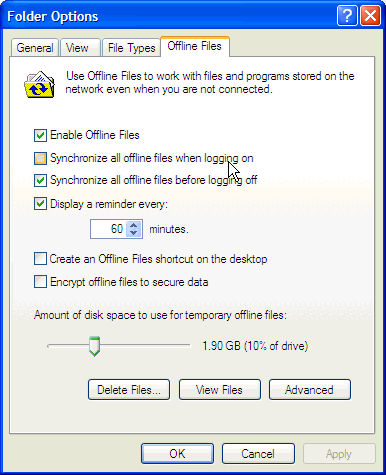
If you have tried to increase the cache size limit in the offline folder settings, then you know that after closing the window it goes back to default settings which is 1.90 GB allocated for offline files.
To permanently increase the cache size allocated to offline files to do the following; click on Start then click on RUN and type gpedit.msc. The group policy window should come up:
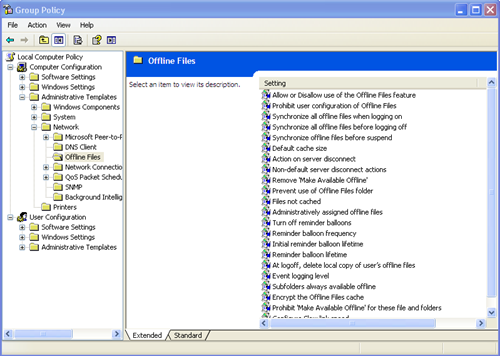
Maximize the Network folder, and click on Offline Files then double click on Default Cache Size. the default cache size property should come up:
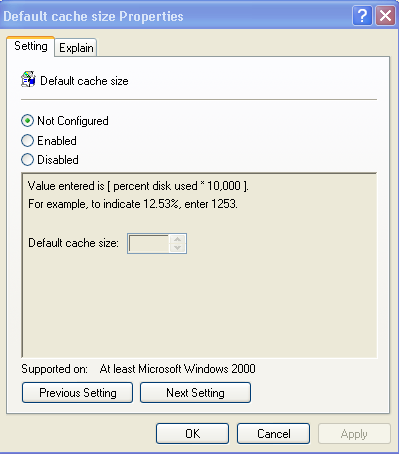
Click on Enable and specify the percentage of the amount of the hard drive space you want use for offline files storage. for example, if you have a 80 GB hard drive, and want to use 8 GB of your entire hard drive, enter 1000 on the default cache size. after you finish click on OK.
one of the things you might notice after you do this is that the slide button to increase the amount of disk space for temporary offline files storage is grayed-out.

That’s normal; because the settings controlling the offline cache size storage is on the group policy
Was this helpful?
1 person found this helpful