
As a computer tech I am very picky of what runs on my computer, so periodically I do a check of all the processes currently running on my computer, and that’s how I stumbled upon this process called “seaport.exe” which I have no idea where it came from, or what it does.
certainly a quick Google search will help!
apparently seaport.exe comes with Windows live application installations, like Windows Live messenger, or Windows Live writer, which I both use. certainly I don’t want this process running on my computer all the time, it consumes too much resources, and in all honestly I don’t like Microsoft doing updates on my system whenever they want. so how I disable this thing?
Seaport.exe runs as a service, so disabling the service will prevent it from running at start-up. to disable to the service click on Start then click on Run type services.msc click on Ok. the service snap-in will come up:
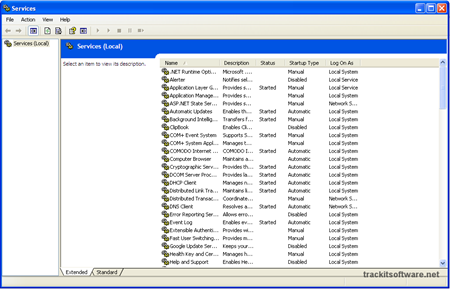
look for the seaport.exe service on the list right-click it and click on Stop:
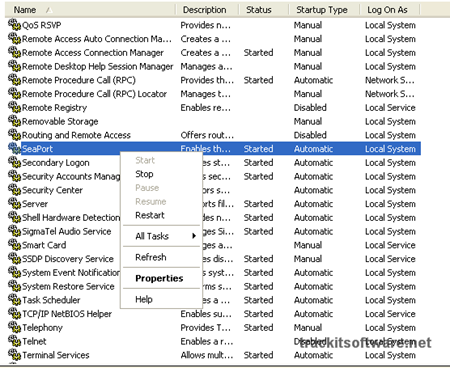
after you stop the services, right-click it again, and click on Properties. the seaport properties will come up:
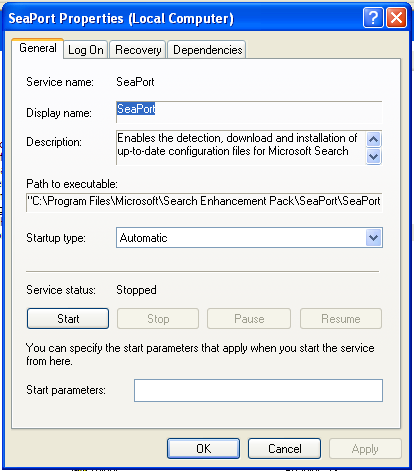
click on the Start up type option and select disabled then click on OK.
if you want to delete the file completely off your computer, on windows XP, it resides on this path: C:\Program Files\Microsoft\Search Enhancement Pack\SeaPort . on windows vista, it should reside at C:\Programs\Microsoft\Search Enhancement Pack\SeaPort
that should get rid of seaport.exe from your computer forever – or at least until you install another Windows live app.


Thanks
Thanks for the tip, my firewall keeps catching these automatically-updating Microsoft programs ever since I installed Live Messenger.
Hi Rob, thanks for stopping by. I normally disable Microsoft updates on my computer, and run a manual update once a week on my machine. I don't like Microsoft running updates on my machine whenever they want, I hate it, especially when you need to reboot.
but some automatic update necessary for health.
Ewe rox!
Thanx
what happens when you delete it? can you still use windows messenger or writer? just wanna know before i delete or disable it. thanks
Can't everybody get together and sue Microsoft for putting such dysfunctional and malfunctiong JUNK in our homes?
I just Disabled this bandit, Seaport, and my CPU Usage dropped to from the dizzying heights.
Didn't they used to ask if you wanted to be a Beta Tester???
Beth , you can still use…
it takes you out of enrollment in one of their marketing schemes, which they call microsoft appreciation or is it customer appreciation? or some stupid thingy so they can make more money in the future by seeing what people do..
and you can't search 'history' but I think you can still search 'history' Favorites,,, naming in History scares people into NOT disabling it.
They WANT everyone on it to assess Market Trends!
Another useless process bites the dust. I never use the microsoft live, don't know where that even came from. Thanks.
"honestly I don’t like Microsoft doing updates on my system whenever they want"
sory but this me me laugh
i agree with you, but is MS, you know.
Cool. Thank you very much for putting this online.
It was driving me crazy.
ty it helped me out toop iu was like what in the world is seaport n now i know so thank you for all the help
I found you post very helpful, even for those who have little or no idea of what is going on with the processes on a computer. I however, was observing the processes in Task manager & the 1st thing to pop into my mind was "VIRUS!" Since I am also a Computer Tech. & I very rarely use this computer.
Viruses are tricky and some times require a Complete Reload of the O.S. I have just started this Corporation and I am still building the above Website.
I repair & maintain so many computers; I sometimes cannot recall which computer needs what Process to work properly for whoever the various users are.
Again Thank You for the very detailed description(s) of this Process and/or Executable.
FTW!!! TY so much for posting this! Every once in an all-too-often while I've had explorer freeze up on me and I have to do a reboot because of this damn "service". Calling something that conflicts with other programs a "service" is a kick in the pants, this would be like getting "serviced" by an oriental masseuse while she wears spud gloves (aka tater mits, look 'em up if you dont know 'em).
Enables the detection, download and installation of up-to-date configuration files for Microsoft Search Enhancement applications. Also provides server communication for the customer experience improvement program. If this service is disabled, search enhancement features such as search history may not work correctly.
Ditto same thing happen just now to myself my computer froze and went into a hard drive running spree. Followed your advise and alls back to normal. Things that make you go hmmmmm….
Excellent instructions..I have been fighting w/this thing for what seems like FOREVER!!
Thanks.
Excellent instructions..I have been fighting w/this thing for what seems like FOREVER!!
Thanks.
Excellent instructions..I have been fighting w/this thing for what seems like FOREVER!!rnThanks.
this why we should all use linux
this why we should all use linuxn
That was done very well–your descriptions!! Thanks a lot for the help.
Regards….Lee
thanks for the info.
They are sneaky, I had found it before, disabled the service and renamed the excutable. The last round of updates snuck it in at a different path- "C:Program FilesMicrosoftBingBarSeaPort.EXE" (on XP)
Very interesting article you have here.I am working for a <a rel="follow" href="http://us.trendmicro.com/us/products/enterprise/datacenter-security/deep-security/">Data Center Security company and I heard that there are several programs which work in background and have different utilities.I guess your problem can be solved very easy if you find out what that exe. file does.
Thanks! I use a startup controller program called Startup Organizer. Also, Online Armor firewall asks me if I want to let it run. It's been alerting me that the program wants to run when the desktop loads.
Appreciate it loads. Many thanks!!
Instead of disabling it, I ran this command on my XP PC to permanently uninstall the SeaPort service:
MsiExec.exe /X{06E6E30D-B498-442F-A943-07DE41D7F785}
Thanks.
thanks!! much appreciated
)
On my netbook, the service was BBUpdate and the file was C:\ProgramFiles\Microsoft\BingBar\SeaPort.EXE
Thanks. This one recently popped up on a relatives computer and I was asked to find out what it did. I’m more careful on my systems and don’t allow services unless I know what they are or request them.
Thanks so much for such a detailed description!
Glad I found your article. It is easy to follow and puts me at ease knowing all i will lose is the ability to see my history but then i don’t use internet explorer anymore so no loss.I’m constantly shutting down processes on the task manager . now I may be able to go in and actually stop some form loading with your information. There are some you can’t shut down as I learned. Many are necessary for the system to run properly but I have up to 40 processes running at a time and would like to cut that back.
One process called tea timer is software for a anti spyware program and takes a lot of space. I’m not sure I should shut it down at start up.
thanks