

I’ve been running Windows 7 on my working laptop for a week now, and so far I could not be happier with the OS performance, it just works. I understand this is a beta version, and I was expecting some bugs to come up along the way. the first issues I was expecting were driver problems, but amazingly windows 7 found all the drivers on my Dell M1210 laptop. the other thing I thought I would have problems with was application comparability, but so far no problems with any application. I’m running applications that I had many issues on Windows Vista. but anyways, I think is too early on my testing phase to be glorying windows 7, so I will hold my excitement for another post. for now I will talk about this new tool called Remote Server Administration Tools on windows 7.
With remote server administration tools you are able to manage Active Directory and other network resources right from your computer, ya know, like you do with admin tools on windows server 2003 and MMC console.
download the pack from Microsoft at the following URL:
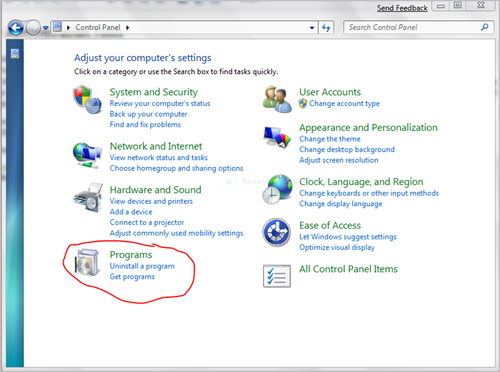
http://www.microsoft.com/download/en/details.aspx?id=7887 after you install the pack you will need to go to control panel and click on the Programs applet.
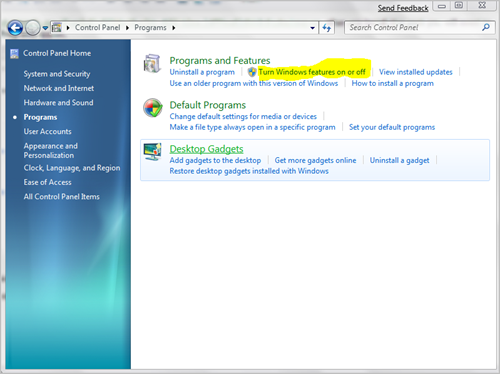
then click on turn Windows features on and off.
the Windows Features window will come up:
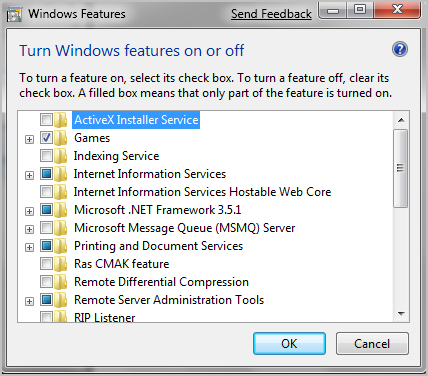
This window above, kind of replaces the Add/Remove Windows Components on windows XP. from this window you can install all the system and management tools. if you look at the bottom, you will find the Remote Server Administration Tools which you can expand and see all the goodie tools.
under the AD DS Tools you can find the active directory stuff.
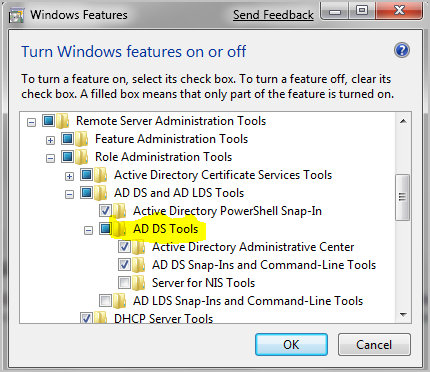
Select the tools you want to install from there and hit OK. one add-in that I use a lot is Active Directory Users and Computers, which can also be installed from here.
Was this helpful?
2 people found this helpful